Ultimate Morph, Waystone & Dragon Mounts: Download & Install Guide
🎮 Introduction
Minecraft is a sandbox like no other — but with mods, it transforms into an entirely new world of possibilities. Whether you dream of shapeshifting into any creature, teleporting across vast lands instantly, or taming and riding powerful dragons, the right mods can make it happen.
In this guide, we’ve handpicked three game-changing mods that elevate your Minecraft experience to legendary status:
-
The Ultimate Morph 2.0
-
Simple Waystone Add-on
-
Dragon Mounts: Legacy


Each step of this blog post will walk you through what the mod does, why it’s epic, and — most importantly — how to download and install it safely. Whether you’re a modding beginner or a seasoned crafter, this quick guide has you covered.
Let’s dive in and power up your Minecraft world!
🔹 Step 1: Install The Ultimate Morph 2.0
About: Want to transform into anything and troll your friends? Then The Ultimate Morph 2.0 is the perfect addon for you! With this easy-to-use addon, you can morph into:
- Mobs: Zombie, Cow, Allay, Armadillo, and more,
- Blocks: Diamond Block, Wooden Plank, Glass, etc.,
- Items: Player Head, Saplings, Trapdoor, etc.,
- Furniture: Table, Chair,
- Gaming Characters: Kratos, Spiderman, CJ, and more,
- Anime Characters: Naruto, Gojo, Luffy, etc,
- Extras: Squid Game characters, John Cena, Pennywise, and many others.
How to Use:
- Open the Morph Menu:,
- Grab the "DG MENU" from your inventory.
- Use it to open the morph menu.
- Choose a category, then select any option to morph instantly.
- Return to Player Form:
- Use the "DG Player Morph" item to revert back to your original self.
- Blend In Naturally (Solidifier):,
- Use the "DG Solidifier" item to lock your position, making you look like a real block or furniture—perfect for hiding.
Still confused? Watch the tutorial video:

✅ Why You'll Love It
-
Morph into creatures, items, blocks, and characters with a single tap.
Special Abilities:
- Creeper: Crouch to trigger the explosion animation.
- Zombie: Beware of sunlight—you’ll burn!
- Hostile Mobs: Other hostile mobs won’t attack you.
- More unique abilities depending on the morph.
-
Includes features like the DG Menu, Player Morph, and Solidifier for enhanced gameplay control.

🔗 Download Link
👉 Download The Ultimate Morph 2.0 from our Official Discord
Join the Discord to get access to the mod files and updates.
Screenshots:


🎮 Installation Instructions
-
Join the Discord server and download the
.mcaddonfile from the mods section. -
Open the file with Minecraft; it will automatically import the mod.
-
In Minecraft, go to:
-
Settings → Add-Ons → Behavior Packs
-
Enable “The Ultimate Morph 2.0”
-
-
Load your world and access the DG Menu in your inventory.
-
Start morphing instantly!
🎥 Watch All 3 Mods in Action
👉 See them all on YouTube here
🔹 Step 2: Install Simple Waystone Add‑On
Want instant teleportation between your favorite spots? The Simple Waystone Add‑On makes it possible!
- Craft
To create a Waystone you first need to create a Warpstone. And With it and any material you can create your Waystone:

 ✅ Why It’s Must-Have
-
Fast Travel: Set custom waystones and teleport between them instantly.
-
No Commands Needed: Easy activation and use via crafting—no cheat commands required.
-
Customizable: Rename waystones for easy organization.
🔗 Download Link
👉 Download Simple Waystone Add‑On from our Official Discord
You'll find it in the “mods” or “add‑ons” channel.
🛠 Installation Instructions
-
Join the Discord server and grab the latest
.mcaddonfile from the Waystone section. -
Open the file: Minecraft will automatically import the add‑on.
-
In Minecraft, navigate to:
-
Settings → Add‑Ons → Behavior Packs, then apply Simple Waystone Add‑On.
-
-
Start a world and craft a waystone using its crafting recipe.
-
Use the crafted waystone to create in-game teleport points. Interact to teleport instantly!
🎥 Check out the showcase of all 3 mods here
👉 Watch the mods in action on YouTube
🔹 Step 3: Install Dragon Mounts: Legacy
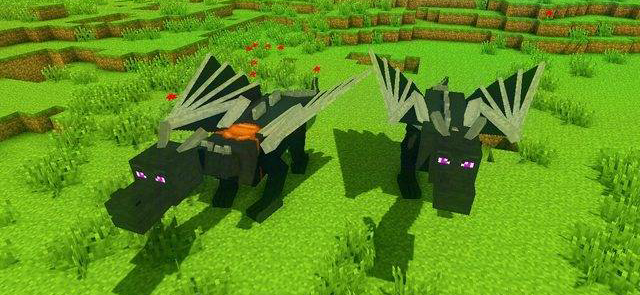
Dream of hatching your own dragon and soaring across your Minecraft realm? The Dragon Mounts: Legacy mod makes that fantasy a reality!
˙⋆⟡ QUALITY OF LIFE FEATURES ⟡⋆˙
- No need to toggle any experiments!
- You can now earn achievements when playing with Dragon Mounts!
- The add-on has an option for Realms and Dedicated Servers compatibility!
- Vanilla Dragon Eggs can be converted to Dragon Mounts's Ender Dragon Egg
˙⋆⟡ HOW TO TOGGLE REALMS ⟡⋆˙


!!! KNOWN ISSUES !!!
- You need to fully delete the older versions of the add-on to properly play with the newer versions
- You may need to start a new world to apply new versions of the add-on
- Not compatible with Dragon Mounts 2
˙⋆⟡ ISSUES / BUG REPORTS ⟡⋆˙
If you found something that doesn't look right, is probably a bug, or is just flat out broken please head over to our Discord to report it!
˙⋆⟡ LICENSE ⟡⋆˙
The add-on's binaries, as well as it's textures and code are licensed under the GNU General Public License v3.
Dragon Mounts 1 and 2 are both owned by Tomanex, JDSKoala and the Dragon Mounts Team.
© 2018-2025 Dragon Mounts Team.
˙⋆⟡ SOCIAL MEDIAS ⟡⋆˙
˙⋆⟡ CREDITS ⟡⋆˙
Developers:
Contributors:
- LegitDragonb0y - Cool dude, check out his Dracomalum add-on!
- Grummboy2 - New Spawn Egg textures
Original Java Developers:
- BarracudaATA - The original project author for Dragon Mounts
Images
✅ Why You’ll Love It
-
Hatch, raise & ride different types of tamed dragons.
-
Dragons come in various colors, sizes, and abilities, adding dynamic variety to gameplay.
🔗 Download Link
👉 Download Dragon Mounts: Legacy from our Official Discord
Find it in the “mods” section under Dragon Mounts.
⚒️ Gameplay
Ever find it boring and unsatisfying when you defeat the Ender Dragon and the egg is practically useless other than being a trophy and a decoration? Well now you don't have to worry, as this addon adds 8 new dragons into your game as a reward for defeating the Ender Dragon. Finally giving a reason to go to the end and put the egg in good use!
˙⋆⟡ HOW TO PLAY ⟡⋆˙
Step-by-step guide on Dragon Mounts
► How to train your Minecraft dragons?
- To tame your dragon, use any raw fish except pufferfish.
► How do I heal my dragons?
- To heal your dragon, use any raw meat except pufferfish and dragon meat.
► How to equip a saddle on your dragons?
- Open the inventory of your dragon while you're riding them.
► How do I breed the dragons?
- To breed your dragon, use any raw fish except pufferfish.
► How to fly with your dragons?
- Press jump. The control your dragon using the arrow keys.
► How to hatch the Dragon Eggs?
- You just interact with them until you see particles, which means it's incubating.
► How long does it hatch?
- Usually about 20 minutes.
► How do you convert Dragon Eggs into other Eggs?
- You place the eggs above certain blocks and it takes 5 minutes, see "Egg Conversion" tutorial below.
🛠 Installation Instructions
-
Join the Discord server and download the
.mcaddon(or.mcpack) file for Dragon Mounts: Legacy. -
Open it so Minecraft automatically imports the add-on.
-
In Minecraft:
-
Go to Settings → Add-Ons → Behavior Packs and apply Dragon Mounts: Legacy.
-
-
Start or reload your world.
-
Craft a Dragon Egg or find one naturally in your world.
-
Hatch the egg in water to reveal your dragon.
-
Ride and tame it using a saddle and scare with dragon treats—then take to the skies!
🎥 See all 3 mods in action and explore the epic gameplay
👉 Watch the complete showcase on YouTube
✅ 💡 What’s Next?
-
With all three mods installed, you can morph into creatures, teleport across your builds, and ride powerful dragons—mix and match for ultimate fun!
-
Share your gameplay with our community, exchange morph codes, teleport locations, and dragon strategies.
-
Have any issues or questions? Just ask on the Discord server—we’re here to help!
🧠 Conclusion
With just three powerful mods, your Minecraft world can feel brand-new again. Here’s what you’ve unlocked:
-
Ultimate Morph 2.0 turns you into anything—from mobs to anime icons.
-
Simple Waystone Add‑On enables instant travel across your builds.
-
Dragon Mounts: Legacy lets you hatch, tame, and soar on your very own dragons.
These aren’t just cool mods—they’re tools to supercharge your gameplay, speed up exploration, and boost immersion like never before. We highly recommend using all three together for a dynamic, adventure-filled experience. Whether you're building, battling, or roleplaying—these mods bring out the full power of Minecraft.
Have thoughts or run into issues? Drop your questions in the comments or join the official Discord to chat, troubleshoot, or share your modded world.
🎥 Don’t forget to watch our showcase video to see it all in action:
👉 Watch now on YouTube❓ FAQ Section
🔧 Why won’t the mod install?
-
Make sure you’re on Minecraft Bedrock Edition if using
.mcaddonfiles. -
On Java Edition, ensure you're using the correct
.jarversion and have Forge installed.
💻 Does this work on mobile?
Yes! All three mods support MCPE on Android and iOS. Just open the
.mcaddonwith Minecraft.🔁 Can I use them together?
Absolutely! The mods don’t conflict and can be installed in the same world for a fully modded adventure.
🧩 What Minecraft versions are supported?
-
Ultimate Morph 2.0: Supports versions 1.20+ (Bedrock).
-
Simple Waystone Add‑On: Bedrock 1.18+.
-
Dragon Mounts: Legacy: Available for Java and Bedrock, version-dependent.
🗂 Do I need to enable Experimental Features?
Yes—for best results, enable:
-
Holiday Creator Features
-
Additional Modding Capabilities
-
Custom Biomes/Items (if prompted)
-


Comments
Post a Comment